Thursday, January 10, 2013

Determine the Ship Date of Your Pebble Kickstarter Order [Outdated]

UDPATE - This post is quite outdated due to some updates from the folks at Pebble. My attempt to re-estimate was lost in the Blogger auto-save world and I don't have time to redo it.

If you haven't heard, they announced at CES yesterday that Pebbles will start shipping on January 23, 2012. This is very welcome news for my fellow backers and I who have been following their story and updates closely since early April 2012.
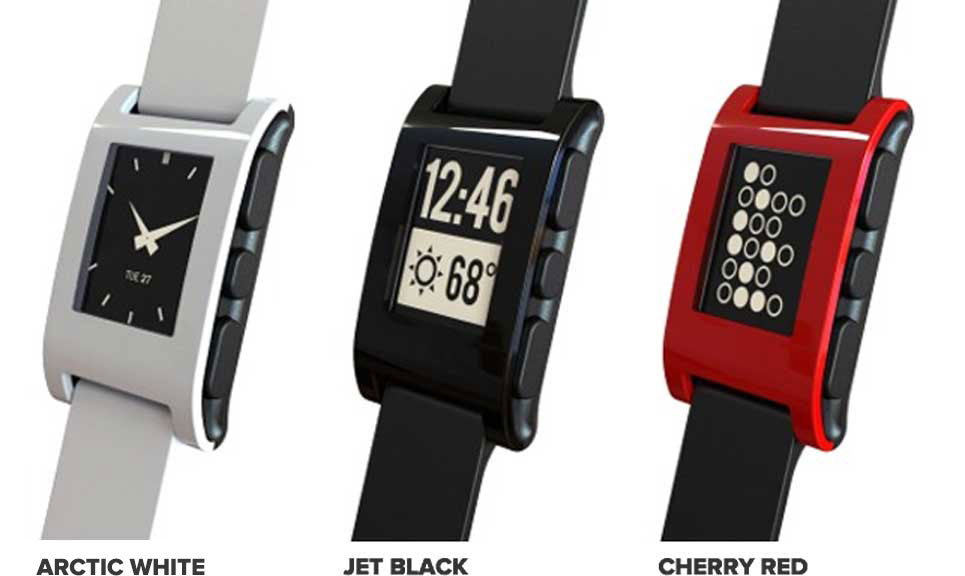
Image from Pebble

Thanks to Kicktraq we can use the funding progress graph to determine an approximate ship date for your Pebble smart watch.
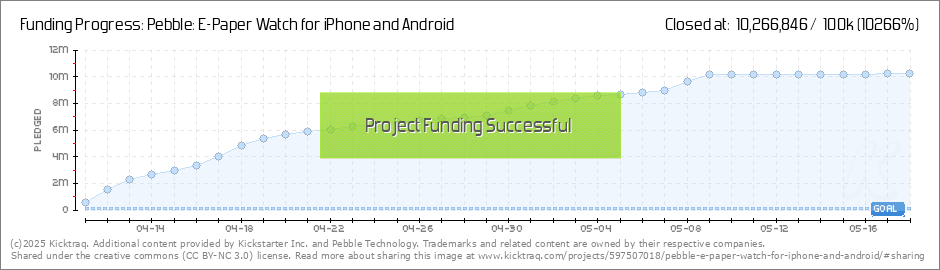
Image from Kicktraq

First you'll need to find the date that you backed the project, personally I did on 4/14/12. As far as I can tell, the only way to get this information is from the confirmation email they sent you. If you log into Amazon Payments, you get the 5/18/12 date since that is when the project finished the Kickstarter campaign and credit cards got charged - this isn't the date you backed the project.

[UPDATE] - Thank you to Brian Phillips for pointing out this tip on how to determine your backer date if you cannot find your email from Amazon Payments: "...sign into Kickstarter then go to My Backer History (drop down the menu under Me in the upper right corner), it will tell you what day you backed the project."

Now you'll need to figure out how much money was raised at the time you funded the project. There were 85,000 watches ordered with $10,266,844 raised. Naturally there are various factors we cannot account for - some people only backed a few dollars rather than buying watches, and some watches cost more than others, so this is an approximation.

It is crude math, but let's say the average watch cost $120.79 ($10,266,844/85,000) - a reasonable assumption if you ask me. They said they will be making 15,000 watches per week, and shipping starts on 1/23/13. It is safe to assume at least 30,000 watches will have been made at that point since they entered mass production around 1/9/12 or before - meaning at least 2 full weeks of full production before they start shipping.

This means that 35% of watches will be made when orders start to ship. So looking at the math, we see that if you ordered by 4/16/12, you are likely to be in the first batch of shipments. However, looking at this chart of backers by day, you see that backing as late as the 18th might still mean you're in the first shipment since that was the day they hit ~30,000 backers.
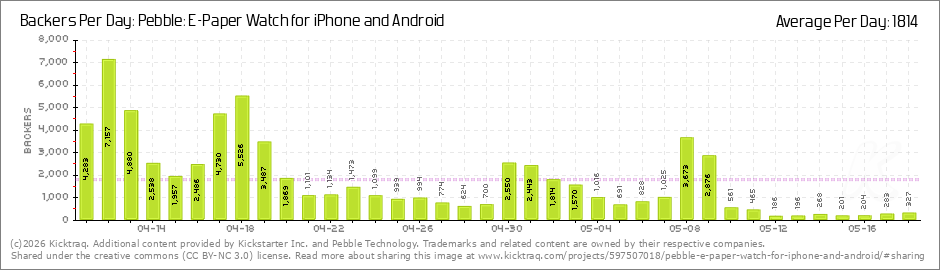
Image from Kicktraq

If you backed after the 16th (or 18th, depending how optimistic you are), you can assume that 15,000 new watches being made every week, resulting in these approximate shipping dates:


I used data from Kicktraq, and as you can see not all $10.2M or 85,000 are accounted for exactly, so there is an error margin here. However, this should give you a pretty good idea of when your order will ship. I will say that these dates seem a bit optimistic compared to the "6 to 8 weeks" Pebble stated would be required to fulfill all Kickstarter orders. I have absolutely no affiliation with Pebble, nor do I have any inside information. This is just an attempt to use publicly available information and numbers (huge thanks to Kicktraq) to put this together.

They will be shipping via USPS and will be contacting you approximately a week before your order ships.

I hope this help since I'm sure all of you fellow backers are as excited as I am about this!

Monday, January 7, 2013

A Great Gmail Guide

No need for an extensive write up, this site handles it. Here's a fantastic guide to understanding why Gmail is simply amazing, how to use it, how to make it work for you, etc.

http://gmail-miscellany.blogspot.co.uk/2012/11/gmail-101.html

Tuesday, December 11, 2012

Perceived Value: Why Apple and Costco Aren't So Different

The perception of value weighs strongly on consumers, a lot more than most people realize. It drives us at nearly all levels of consciousness because we inherently want valuable things. Now, keep in mind valuable isn't necessarily monetarily valuable, but can be measured in nearly any way.

We each have our own measure of value for everything in our lives, hence the famous saying "one man's trash is another man's treasure." So, why Apple and Costco? (P.S. those aren't the only two brands that do this.)

The main point is this - a large number of customers of these two companies have convinced themselves they're getting a good deal before they walk in the door.

Costco

At Costco you go in with a list of 10 things, but when you see the mega-pack of toothpaste you realize you're getting low and figure this has to be a good deal, sold. Ever think that the environment and decor wasn't just a warehouse because it is cheaper than a standard retail store? When you walk in and see the vast sea of products, the 100 TV boxes, and the 30 foot tall shelves full of the item you're buying, how could you not be getting a good deal since they bought THAT many of one item for a single store?

In reality, you usually are getting a good deal. Not always, but rarely do the masses comparison shop Costco like they do at Best Buy (I call Best Buy the Tech Titanic). Recently, I found that Christmas lights were 1.8x the price for 1/2 the length strands for LED bulbs at Costco, they were selling like crazy none-the-less.

The warehouse look isn't the only thing. They put a ton of effort into doing the research for you, so when you go, there is ONE ketchup option to chose. Can you imagine if the grocery store only had one option? The perception of value is different - the grocery store provides value through a wide selection and reasonable quantity options. Costco provides value through bulk pricing and making your choice easy so you don't even have to stop the cart to buy ketchup, you merely slow down as you throw out your back picking up a gallon or two.

The point with Costco is that they hit the nail on the head for making their customers understand the value they provide. Most anyone at Costco walks in the door expecting to spend hundreds and hundreds of dollars and will even laugh when they get to check out and cheer "I did it for less than $400!" (I actually heard that once). The value they're getting isn't being measured by dollars first, so damn the expense, put it on the famous Costco AmEx!

Apple

Albeit an entirely different industry (I'm not sure if Apple has any plans for iKetchup, but I somehow doubt it), Apple is very much the same way with how their products are perceived.

Side note: Apple is a polarizing topic, and many people have blindly 100% dismissed Apple products as a bad deal no matter what, just like some have blindly 100% accepted their products as a good deal no matter what. These are closed minded people and most of them fall under the "troll" category.

Apple demonstrates their value through their famous product introductions (among other ways). The demonstrations are simple, clean, well documented by the press, and like their products, they are polished... freakishly well polished. Apple demonstrates their value through simplicity. Their products have changed the way society views buttons, they have reshaped industrial design as we know it, and to date there really isn't another product that is mistaken for an Apple product (crappy Chinese knock offs do not count). Apple demonstrates their value through ubiquity. Their products are understood, most anyone can navigate one (even if they never have before), their accessory market is larger than any other by a long shot. Recently they changed their dock connector, so that is a small (but totally necessary) setback for their accessory market, but they've been establishing that market with 10 years of compatibility, that's huge.

So when people are quick to point out why Apple products are expensive and they start comparing technical specs, they've already missed the point by a long shot. That person measures value differently than Apple and Apple has no interest in marketing to them. Tech specs simply aren't what matters to Apple. As Matt Drance points out (highlighted by John Gruber), "It's no coincidence that the 'Tech Specs' link atop apple.com/iphone is dead last."

Does that make people who measure tech specs wrong? No. I think tech specs have their place, and as a geek I have a deep appreciation for them. However, Apple has done a good job of showing why the product experience is more valuable than the tech specs for their products, and that is just something not everyone will agree on. No worries.

What this means is that just like Costco, people walk into an Apple store expecting to spend money because money isn't the most important thing in how they're determining the value of the products. Their perceived value of Apple products is just higher than other products. It is a reason why their product margins are higher than competition. The people who don't understand why people pay what they pay are the people who either don't know enough to understand that perception of value, they're too closed minded to accept it, or they genuinely don't put value in what Apple does.

It is a very interesting phenomenon, but is nothing new and not unique to Apple in any way. The way Apple could become unique is if they are able to survive the life-cycle that every other company in history has fallen victim to. Only time will tell.

Tuesday, November 27, 2012

Phone Buying Advice for the Non-Tech Inclined

Phone buying advice is not hard to find, rather it is hard to avoid. More than that, it is one of the more polarizing topics outside of religion and politics with the tech geek world. There's a fundamental problem with that though, and I've got some basic tips that can help to guide you to picking the right phone for you rather than the Verizon/AT&T/other employee who is selling it to you.

Employees of cell network carriers tend to be pretty familiar with smartphones, but not necessarily all phones. This leads to extremely biased dialog as they suggest their phone to everyone who walks in the door. The problem is that smartphones aren't a one-size-fits-all type of purchase. The people in the greatest need of tech advice get told to purchase a phone that may not be right for them. I have seen it happen several times, and once a person is convinced to buy a phone they will defend that purchase to the death to avoid feeling mislead.

This results in discomfort or malcontent for the phone, and then the user doesn't get to enjoy the phone as they rightfully should after spending that kind of money (monthly and/or up front). It is insulting to the customer, but if they don't know other phones that could more closely meet their needs exist, they'll never see how they've been wronged. Ok, enough of the rant, onto advice.

This article would be extraordinarily long if it were complete, but there are some key points that I'd like to mention.

Don't Get Blinded by "Features"

This point is the most important, and hands down the one that most people fall for - especially when you've got a salesperson telling you that you need phone X because it has the biggest screen, fastest processor, most apps, near-field communications (NFC), or any other feature they point to. This isn't to say these are to be avoided, these features are fantastic, but they aren't all fantastic for every consumer, a fact often overlooked.

The critical piece for the customer is to focus on what they need from their phone, how they plan to use it, and focus on how they can achieve this by prioritizing features. This takes a custom approach for the salesman to understand the user and guide them toward the right purchase for them. It is more time consuming and I have never seen a carrier store employee take the time to do this.


Considerations to make before committing to a purchase...

Screen Size - Things to consider here are what you'll do on the phone (movies, reading, games might warrant more screen space), but also how it affects the size of the phone. How big are your hands, can you reach the far corner when you're holding it with one hand?

Camera Quality - For many, the camera on smartphones has replaced the point and shoot we used to carry around. Do you have kids or puppies that move quickly? Make sure to check review on how quickly the camera snaps shots, how quickly the app opens, and how the quality compares. The built in sharing supporting your favorite social network (or Shared Photo Streams for iOS users) is a plus.

Battery Life - This is important, but more for some than others. Those with desk jobs and 10 chargers laying around might not consider this as critical as those on job sites for 2 days at a time.

Apps - As far as phones go, Android and iOS both have more than you'll ever need for apps. Windows Phone and BlackBerry might not.

"Open" vs. "Closed" - Don't get fooled... I cannot tell you the number of people that I've heard rag on iOS for being "closed" or praising Android for being "open" and NOT be able to back it up with an example of how this was actually a problem for them. There ARE pros and cons for each, but the guy at the Verizon store telling you an iPhone is "closed" (and they all do in my experience) means nothing to the vast majority of people. Before you commit, talk to someone with each platform you're interested in and ask them how they do X or solve problem Y. The odds are very good you'll find satisfactory (or even enjoyable) solutions on every single platform. Note: This is in reference to "normal" tasks from non-tech savvy users. There are examples where this simply doesn't hold true.

Extended Screens - Your smartphone isn't just a smartphone anymore. It is a hub for your life and can be used to broadcast to your TV, stream music to wireless speakers, print (haha, who the hell prints anymore?!), or seamlessly share content. For $99 any iOS device can stream video/audio to an Apple TV. Google is reportedly working on an "open" alternative to that. iOS devices have Shared Photo Streams that shares photos seamlessly via iCloud. These are just a few examples, it is worth considering how well your new phone will integrate with the technology you already have or want to get soon.

Price - Price is a factor to almost everyone, but will you kick yourself for saving $30 and being miserable (or even inconvenienced) for the next 2 years? Sure a toy today has a great deal of appeal, but what if you save up for 4 more weeks and get your dream phone?

Understanding 4G - Not all 4G is the same, and carriers are anything but straightforward with you (unless you meticulously read the fine print). Here's a guide to understanding 4G - Understanding when "4G" isn't 4G.

Accessory Market - How good is the accessory market, and do you need many? People who drop their phones a lot will need a good rugged case, some phones have very few (if any) rugged case options available. Do you need a charging cable everywhere you turn? Are they easily (and cheaply) available? How about a dock for your alarm clock?

Understanding When "4G" isn't 4G


Not All "4G" is Equal

Most carriers are lying to you. I find it a bit insulting, here is what you need to know to make informed decisions about 4G.

The term "4G" is overused, abused, and throughly misleading... thanks to the carriers. Real 4G networks are Long Term Evolution (commonly referred to as LTE) and WiMax (which Sprint is repurposing for prepaid 4G service only). Fake 4G, referred to by most geeks as 3.5G, is HSPA+ and is almost entirely what AT&T and entirely what T-Mobile rely on and call "4G".

You probably recognize "LTE" from Verizon commercials, that is because they're the only carrier that isn't lying to you about their 4G coverage. Here's what I mean... (iPhone 4S users, there's a section specially for you below.)

AT&T

AT&T claims to have the "largest 4G network." This conveniently avoids defining what they mean by "4G" because their coverage isn't actually 4G, it is 3.5G or HSPA+. Here are the coverage maps to compare AT&T vs. Verizon on their 4G LTE coverage.

AT&T 4G LTE Coverage

Verizon 4G LTE Coverage

It is worth mentioning that the places where AT&T has LTE coverage, it is very fast and reportedly satisfactory, same as Verizon.

T-Mobile

The lies don't stop there, T-Mobile has no 4G LTE coverage to speak of, they plan to start building it in 2013.

T-Mobile tries to sell their "4G" network (actually 3.5G) by comparing to other carriers. There's just one problem, they aren't comparing apples to apples. In this head-to-head with Verizon, they compare the Samsung Galaxy SII (T-Mobile) to the iPhone 4S (Verizon). They cover themselves legally by noting this in the fine print, but who reads that? The iPhone 4S on Verizon is a 3G device ONLY. There is no LTE support on the iPhone 4S, and Verizon doesn't have an HSPA+ network (which the iPhone 4S does support if the network does). They compare 3.5G HSPA+ to 3G CDMA, there is no relevant comparison to be made. I call bullshit.

iPhone 4S Users, What You Need to Know

I get the confused questions quite frequently with the iPhone 4S regarding 3G/4G support. The iPhone 4S supports HSPA+, which AT&T has and calls 4G. Verizon doesn't have an HSPA+ network, so Verizon iPhone 4S owners never see "4G" in their status bar. However, AT&T iPhone 4S owners do frequently see "4G" in their status bar. I hope the above article helps to clarify why that is. The iPhone 4S does not support 4G LTE, so when your iPhone 4S reads "4G" it is really 3.5G.

Closing Comments

HSPA+ isn't a bad technology and it doesn't result in slow crummy internet connections. It is quite the opposite in fact. I have no qualm with HSPA+ and I like that AT&T customers have that to fall back on before falling back yet again onto 3G. I just dislike the lack of clarity and false inflation of terms to try to sell you things that aren't accurate.

The argument on the flip side of the coin is that HSPA+ speeds are closer to 4G than to 3G, this is true. I saw HSPA+ called "3.75G" rather than 3.5G, and that might be a more accurate term.

What it all comes down to is understanding the network you rely on all day every day. This can save you money and will hopefully save you from the dreaded (biased as hell) salesmen at the carrier's stores.

I'd love to hear your thoughts/counter-arguments in the comments.

Sunday, November 25, 2012

Understanding When "4G" isn't 4G

Not All "4G" is Equal

Most carriers are lying to you. I find it a bit insulting, here is what you need to know to make informed decisions about 4G.

The term "4G" is overused, abused, and throughly misleading... thanks to the carriers. Real 4G networks are Long Term Evolution (commonly referred to as LTE) and WiMax (which Sprint is repurposing for prepaid 4G service only). Fake 4G, referred to by most geeks as 3.5G, is HSPA+ and is almost entirely what AT&T and entirely what T-Mobile rely on and call "4G".

You probably recognize "LTE" from Verizon commercials, that is because they're the only carrier that isn't lying to you about their 4G coverage. Here's what I mean... (iPhone 4S users, there's a section specially for you below.)

AT&T

AT&T claims to have the "largest 4G network." This conveniently avoids defining what they mean by "4G" because their coverage isn't actually 4G, it is 3.5G or HSPA+. Here are the coverage maps to compare AT&T vs. Verizon on their 4G LTE coverage.

AT&T 4G LTE Coverage

Verizon 4G LTE Coverage

It is worth mentioning that the places where AT&T has LTE coverage, it is very fast and reportedly satisfactory, same as Verizon.

T-Mobile

The lies don't stop there, T-Mobile has no 4G LTE coverage to speak of, they plan to start building it in 2013.

T-Mobile tries to sell their "4G" network (actually 3.5G) by comparing to other carriers. There's just one problem, they aren't comparing apples to apples. In this head-to-head with Verizon, they compare the Samsung Galaxy SII (T-Mobile) to the iPhone 4S (Verizon). They cover themselves legally by noting this in the fine print, but who reads that? The iPhone 4S on Verizon is a 3G device ONLY. There is no LTE support on the iPhone 4S, and Verizon doesn't have an HSPA+ network (which the iPhone 4S does support if the network does). They compare 3.5G HSPA+ to 3G CDMA, there is no relevant comparison to be made. I call bullshit.

iPhone 4S Users, What You Need to Know

I get the confused questions quite frequently with the iPhone 4S regarding 3G/4G support. The iPhone 4S supports HSPA+, which AT&T has and calls 4G. Verizon doesn't have an HSPA+ network, so Verizon iPhone 4S owners never see "4G" in their status bar. However, AT&T iPhone 4S owners do frequently see "4G" in their status bar. I hope the above article helps to clarify why that is. The iPhone 4S does not support 4G LTE, so when your iPhone 4S reads "4G" it is really 3.5G.

Closing Comments

HSPA+ isn't a bad technology and it doesn't result in slow crummy internet connections. It is quite the opposite in fact. I have no qualm with HSPA+ and I like that AT&T customers have that to fall back on before falling back yet again onto 3G. I just dislike the lack of clarity and false inflation of terms to try to sell you things that aren't accurate.

The argument on the flip side of the coin is that HSPA+ speeds are closer to 4G than to 3G, this is true. I saw HSPA+ called "3.75G" rather than 3.5G, and that might be a more accurate term.

What it all comes down to is understanding the network you rely on all day every day. This can save you money and will hopefully save you from the dreaded (biased as hell) salesmen at the carrier's stores.

I'd love to hear your thoughts/counter-arguments in the comments.

Wednesday, November 7, 2012

Living with the Nest 2.0 Thermostat

The Nest is a profound re-imagination of an otherwise stale and uninteresting technology - your home's thermostat. You might not be able to picture yourself getting excited about a thermostat, and for a perfectly good reason, but that's about to change. What you're about to see is a brilliant, intuitive, beautifully designed piece of hardware that makes your controlling your home's temperature fun, smart, and interesting - oh and there's an app! Here's their promo video:


Starting to see why this might be fun? Here's what I mean when I say it is beautifully designed.
Source: Nest.com

The learning thermostat.

I have had the Nest 2.0 for 2 weeks now, so I'm only getting started. This has without question been one of my favorite new toys. Nest 2.0 is pictured above and is 20% slimmer than 1.0. They both run the same 3.0 software and have similar feature sets, though the 2.0 is compatible with more systems. Nest has 4 sensors and connects to your home WiFi network to always be accessible via any computer or smartphone. The first week or so you'll want to program your Nest when you expect to see a change. You can set up a schedule and even still you may make manual changes here and there. You'll notice it starts to get smarter as you use it. 

Nest understands that your life isn't clockwork, your Monday schedule last week might not be your Monday schedule this week. Yet when an unexpected snow storm hits next Monday and you forgot to set the schedule to warm up right before you get home, you won't even need to use the app to do it because it is aware of the weather and will do it for you.

Talking with people who have had the first generation Nest for a year, they say they haven't touched or programmed their thermostat in months even as they transition between seasons, they are just always comfortable. One of those houses was even a more dynamic house with a few people living there and roommates moving in and out periodically, Nest figured it all out.

Nest is smart, eerily smart.

Nest knows the weather outside, it knows when you're home or away, and it knows what temperature keeps your family comfortable and when. It knows the difference between you being home yet asleep and you being away, though I haven't done extensive testing to "trick" it. It did figure out when we left for the weekend after only 1 week of ownership. A big perk for us is that it doesn't misunderstand your dog's motion as thinking you've gotten home. 

Like other smarter thermostats it will inform you when your filter needs to be changed too. Yet unlike many thermostats there is attention to detail and efficiency everywhere you look. As a great example, when you run your AC and your house reaches the desired temperature, it shuts off. What about all the cold air still in the system though? The Nest understands when your home is nearing the desired temperature and shuts off the AC but continues to pump the cool air. This can save you as much as 20%* of your AC run time, that is extraordinary!
*Source: Nest.com

Green.

Nest is designed to keep you comfortable, but also to keep you informed and help you make greener choices. This translates to money in your pocket and feeling good that you've done something good for the planet.

When you're setting your system (or it sets itself) to a temperature that requires less heating or cooling to achieve, you see a small green leaf on the display. It sounds tiny, but it is really powerful feedback. If you were leaving for the afternoon and lowered your heat to say 65 but noticed a leaf when you accidentally went past it to 63, wouldn't you leave it at 63? I have found that just a couple of degrees has made me "greener" nearly every single day.

From the app or web app you can monitor your usage to see when your system is running, what the resulting temperature is, and how that related to the weather outside that day. We just bought our house so we don't have previous years of data to compare bills to, but I know with our previous stagnant single temperature setup we are saving a significant amount of money with our new Nest without question.

The critics.

There are critics of the Nest that claim the Nest is no (or hardly) better than a standard programmable thermostat. Is Nest a programmable thermostat? Well yes, in the same way that a Bentley is a car. (Insert a joke about the cost here!) The Nest is much smarter than any other thermostat, it is much more accessible than most other thermostats (and even thermostats that have apps to control them pale in comparison with app quality and functionality), and frankly it is designed by folks who care. A thermostat doesn't have to be a hideous white brick on your wall.

Cost.

Naturally the biggest drawback here is cost. The Nest 2.0 costs $249 and can be purchased at Amazon.com**, Nest.com, or others. High end programmable thermostats are $150 to $200, and even a decent lower end one is going to cost you $80. The efficiency savings, the convenience of control on-the-go, the beautiful design, and the extremely powerful data it gives you about your system usage, all more than make up for that price.

**At the time of writing Amazon appears to be out of stock and claiming it is $289 and only available through 3rd party retailers, I know this isn't true since that's where I got mine.


I cannot recommend this product more highly. I love my Nest and it was worth every penny. Please feel free to ask questions in the comments. Since I've only had it a short time, I might have forgotten to elaborate on a particular subject, please feel free to let me know and I'll add to my review!